
Omnichannel
Selling on Lazada
Lazada is one of Thailand’s leading marketplaces, known for LazMall’s authentic brands, big monthly campaigns and a full set of in-app marketing tools. If you want to open a shop or grow sales on Lazada, this guide covers everything from opening a store and choosing a sales model to managing back-end orders so you ship on time for every campaign.
What Are Lazada and Lazada Seller Center?
Lazada is an online marketplace operating in several Southeast Asian countries, including Thailand. Shoppers buy through both the app and the website, from everyday sellers to official brands in LazMall. Lazada is best known for trusted branded products and major sale campaigns such as 11.11 and 12.12.
Lazada Seller Center is the back office for sellers, available on the web and in the Lazada Seller Center app. Sellers manage everything in one place: listing products, handling orders, replying to chats, setting promotions, buying ads, and tracking sales and store ratings.



Benefits of Selling on Lazada
Why open a store on Lazada

Large Customer Base Nationwide
One of the most used shopping apps in Thailand, reaching customers in Bangkok and across the provinces.

LazMall Builds Trust
A dedicated space for brands and authorized distributors that assures customers they are buying genuine products.

Big Campaigns Every Month
Double-date sales, Payday and Mega Campaigns drive huge traffic to the app.

Built-in Marketing Tools
In-app ads, store vouchers and spend-and-save promotions, all set up in Seller Center.

Sell via Live and Affiliate
Sell live on LazLive and let others promote your products through Lazada Affiliate.
Flexible Payment Options
Cards, e-wallets and cash on delivery (COD) remove barriers to purchase.

Large Customer Base Nationwide
One of the most used shopping apps in Thailand, reaching customers in Bangkok and across the provinces.
LazMall Builds Trust
A dedicated space for brands and authorized distributors that assures customers they are buying genuine products.
Big Campaigns Every Month
Double-date sales, Payday and Mega Campaigns drive huge traffic to the app.
Built-in Marketing Tools
In-app ads, store vouchers and spend-and-save promotions, all set up in Seller Center.
Sell via Live and Affiliate
Sell live on LazLive and let others promote your products through Lazada Affiliate.
Flexible Payment Options
Cards, e-wallets and cash on delivery (COD) remove barriers to purchase.

Types of Sales Models on Lazada
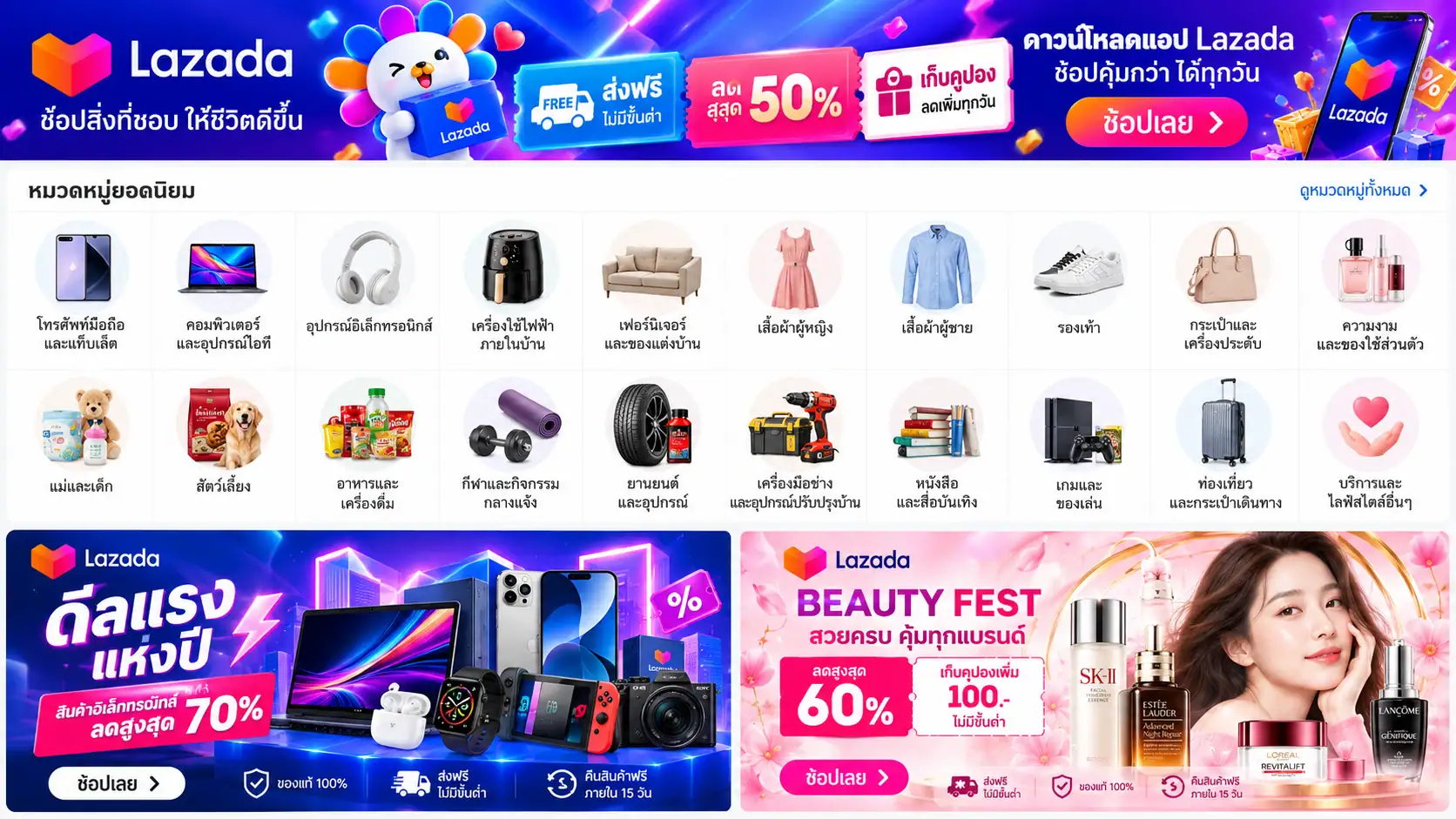
Marketplace Store
Open a store as an individual or a registered company. Ideal for small brands just starting to sell online.

LazMall
Official brand stores that pass Lazada’s selection criteria, earning the LazMall badge and access to exclusive campaigns.

LazLive Live Selling
Sell through live streams in the Lazada app, engage customers in real time and close sales fast. Great for products that need a demo.
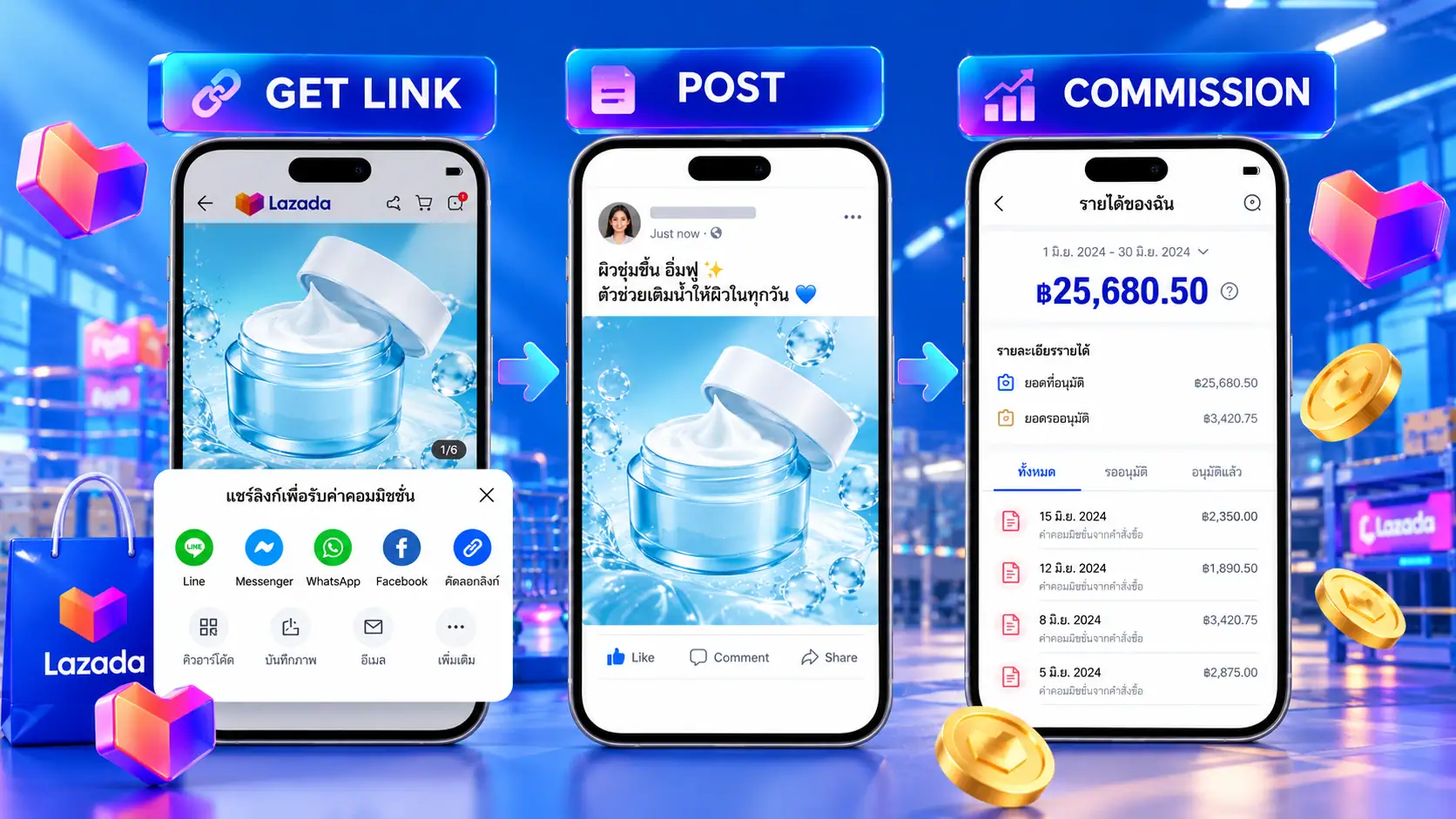
Lazada Affiliate
Pay commission to creators, influencers or bloggers who promote your products, only when a sale is made.
How to Open a Shop on Lazada
Register a Seller Account
Go to the Lazada Seller Center website or download the Lazada Seller Center app, sign up with your phone number, and choose to sell as an individual or a company.
Verify Your Identity and Bank Account
Upload your ID documents and bank account details for payouts, and complete your store and return addresses.
Set Up Your Store and List Products
Add your store name, logo and storefront, then list products with photos, name, price, category, variations (color/size), SKU and parcel dimensions and weight.
Set Up Shipping and Go Live
Choose your shipping method. Once products pass review they go live right away. If you use a fulfillment provider, connect your store to their system at this step.
That’s all it takes to open a shop on Lazada. Documents and steps may change with Lazada’s policies, so check the latest sign-up page before you start.
Things to Know Before Selling on Lazada
Before opening a shop on Lazada, keep these points in mind to grow smoothly and avoid platform penalties.
Lazada’s Rules and Policies
Read the rules on prohibited items, use of images and trademarks, and the penalty point system. Repeated violations can restrict your selling.
Know the Fees
Expect sales commission, payment fees and service fees for programs you join. Rates vary by category, so check the latest rates in Seller Center before pricing.
Keep Stock Ready
Running out of stock after an order forces a cancellation, which directly hurts your store rating.
Storefront and Product Pages
Clear photos, product names with the keywords people search for and complete details help both search ranking and conversion.
Store Rating and Shipping
Lazada measures on-time shipping, cancellation rate and chat response. Good scores affect your eligibility for campaigns.
LazMall
For brand owners and authorized distributors. There are extra criteria and documents, but you gain credibility and special privileges.
Ads and LazLive
Use in-app ads to get products seen first, and live streams to close sales during campaigns.
Analyze Results with Data
Track sales, traffic and conversion in Business Advisor in Seller Center, then adjust products and promotions.
Lazada’s terms are updated from time to time, so sellers should check announcements in Seller Center regularly.
Strategies and Techniques to Sell Well on Lazada
Get Your Store Ready Before Mega Campaigns
- Double-date sales and Payday: Register for campaigns early in Seller Center and set up promotions before the big day.
- Flash Sales and vouchers: Create urgency, and use spend-and-save deals to raise basket size.
- Stock and packing capacity: Campaign orders can multiply several times. Miss the SLA and your store rating drops immediately.

Use Data to Make Decisions
- Business Advisor: Find products with high traffic but low conversion, then fix the photos, price or description.
- Study competitors: Compare prices, promotions and reviews of stores in the same category.
- In-app keywords: Use the words customers actually search for in product names and categories to rank better.

Bring In Off-App Traffic and Build Repeat Customers
- Affiliates and influencers: Let creators promote your products and pay based on actual sales.
- Social media: Drive people from Facebook, TikTok and LINE to your Lazada store.
- Reviews and store followers: Attractive packaging, fast delivery and careful packing earn 5-star reviews. Use follower vouchers to bring customers back.

How MyCloud Helps You Sell Better on Lazada
Connect your Lazada store to MyCloud via API and every order flows into the warehouse automatically, from payment to carrier handover. No manual order entry, no packing yourself, and no SLA worries during campaigns.
01 Customer pays
on Lazada
02 API pulls the order
into OMS automatically
03 Double Check
status with Lazada
04 Pick & pack
video recorded for every order
05 Carrier handover
within 48 hrs per SLA
Stock syncs back to every channel every 3 minutes (Lazada, Shopee, TikTok Shop, etc.)
Learn more about connecting Lazada with MyCloud on our Lazada Integration page.

Connect Lazada via API
Orders and stock sync automatically every 3 minutes, so one stock pool sells across Lazada, Shopee, TikTok Shop and other channels.
Connect Lazada via API
Orders and stock sync automatically every 3 minutes, so one stock pool sells across Lazada, Shopee, TikTok Shop and other channels.

Supports LazLive and Affiliate Orders
Orders from live streams or affiliate links arrive as regular store orders, and the system pulls every one into the warehouse.
Supports LazLive and Affiliate Orders
Orders from live streams or affiliate links arrive as regular store orders, and the system pulls every one into the warehouse.

Warehouse Space and Team
Two warehouses in Min Buri and Lat Krabang with over 10,000 sq m of space, and a team that can handle up to 100,000 orders per day.
Warehouse Space and Team
Two warehouses in Min Buri and Lat Krabang with over 10,000 sq m of space, and a team that can handle up to 100,000 orders per day.

One Integrated OMS & WMS
Orders and stock live in one system, so data moves faster and more accurately than with separate systems.
One Integrated OMS & WMS
Orders and stock live in one system, so data moves faster and more accurately than with separate systems.

On-Time Shipping per Lazada SLA
MyCloud gets Lazada orders ready to ship within 24 hours and handed to the carrier within 48 hours. Our API covers both order intake and ready-to-ship status updates, reducing the risk of platform penalties.
On-Time Shipping per Lazada SLA
MyCloud gets Lazada orders ready to ship within 24 hours and handed to the carrier within 48 hours. Our API covers both order intake and ready-to-ship status updates, reducing the risk of platform penalties.

Packing Video for Every Order + CCTV
Every order is recorded on video during packing and kept for 3 months, ready as evidence for Lazada when a customer reports missing items or requests a return.
Packing Video for Every Order + CCTV
Every order is recorded on video during packing and kept for 3 months, ready as evidence for Lazada when a customer reports missing items or requests a return.
Data Dashboard
See sales and stock for every channel on one screen and compare Lazada with other channels easily.
Data Dashboard
See sales and stock for every channel on one screen and compare Lazada with other channels easily.
Double Check Before Pick & Pack
Order status is checked against Lazada again before picking, so cancelled orders are never packed.
Double Check Before Pick & Pack
Order status is checked against Lazada again before picking, so cancelled orders are never packed.
3-Layer Stock System
Reserved stock, pending-pack stock and on-hand stock prevent overselling when several channels run campaigns at once.
3-Layer Stock System
Reserved stock, pending-pack stock and on-hand stock prevent overselling when several channels run campaigns at once.
Extra Staff for Mega Campaigns
During 11.11, 12.12 and Payday, we add packing staff to match the surge in orders.
Extra Staff for Mega Campaigns
During 11.11, 12.12 and Payday, we add packing staff to match the surge in orders.
Connect Lazada via API
Orders and stock sync automatically every 3 minutes, so one stock pool sells across Lazada, Shopee, TikTok Shop and other channels.
Connect Lazada via API
Orders and stock sync automatically every 3 minutes, so one stock pool sells across Lazada, Shopee, TikTok Shop and other channels.
Supports LazLive and Affiliate Orders
Orders from live streams or affiliate links arrive as regular store orders, and the system pulls every one into the warehouse.
Supports LazLive and Affiliate Orders
Orders from live streams or affiliate links arrive as regular store orders, and the system pulls every one into the warehouse.
Warehouse Space and Team
Two warehouses in Min Buri and Lat Krabang with over 10,000 sq m of space, and a team that can handle up to 100,000 orders per day.
Warehouse Space and Team
Two warehouses in Min Buri and Lat Krabang with over 10,000 sq m of space, and a team that can handle up to 100,000 orders per day.
One Integrated OMS & WMS
Orders and stock live in one system, so data moves faster and more accurately than with separate systems.
One Integrated OMS & WMS
Orders and stock live in one system, so data moves faster and more accurately than with separate systems.
On-Time Shipping per Lazada SLA
MyCloud gets Lazada orders ready to ship within 24 hours and handed to the carrier within 48 hours. Our API covers both order intake and ready-to-ship status updates, reducing the risk of platform penalties.
On-Time Shipping per Lazada SLA
MyCloud gets Lazada orders ready to ship within 24 hours and handed to the carrier within 48 hours. Our API covers both order intake and ready-to-ship status updates, reducing the risk of platform penalties.
Packing Video for Every Order + CCTV
Every order is recorded on video during packing and kept for 3 months, ready as evidence for Lazada when a customer reports missing items or requests a return.
Packing Video for Every Order + CCTV
Every order is recorded on video during packing and kept for 3 months, ready as evidence for Lazada when a customer reports missing items or requests a return.
Data Dashboard
See sales and stock for every channel on one screen and compare Lazada with other channels easily.
Data Dashboard
See sales and stock for every channel on one screen and compare Lazada with other channels easily.
Double Check Before Pick & Pack
Order status is checked against Lazada again before picking, so cancelled orders are never packed.
Double Check Before Pick & Pack
Order status is checked against Lazada again before picking, so cancelled orders are never packed.
3-Layer Stock System
Reserved stock, pending-pack stock and on-hand stock prevent overselling when several channels run campaigns at once.
3-Layer Stock System
Reserved stock, pending-pack stock and on-hand stock prevent overselling when several channels run campaigns at once.
Extra Staff for Mega Campaigns
During 11.11, 12.12 and Payday, we add packing staff to match the surge in orders.
Extra Staff for Mega Campaigns
During 11.11, 12.12 and Payday, we add packing staff to match the surge in orders.